Introducing Para Webhook Support
Introducing Webhook Support. Building real-time, reactive applications just got a lot easier. Para now supports webhooks, giving you a direct line into the events that matter most in your integration, without any polling required.
Introducing Webhook Support for Para. Building real-time, reactive applications just got a lot easier. Para now supports webhooks, giving you a direct line into the events that matter most in your integration, without any polling required.
Here's what's new and how to get started.
What Are Para Webhooks?
When something meaningful happens in your Para integration like a user signs up, a wallet is created, a transaction is signed a user signs up, a wallet is created, a transaction is signed, Para will instantly send an HTTP POST request to an endpoint you control. Your backend receives the event in real time and can act on it immediately: trigger a workflow, update your database, send a notification, or anything else your application needs.
No more repeatedly hitting the API to check on state. Just configure your endpoint and let the events come to you.
Setting Up Your Webhook
Getting started takes just a few minutes from the Para Developer Portal:
- Navigate to the Webhooks page for your API key
- Enter your HTTPS endpoint URL and enable the webhook toggle
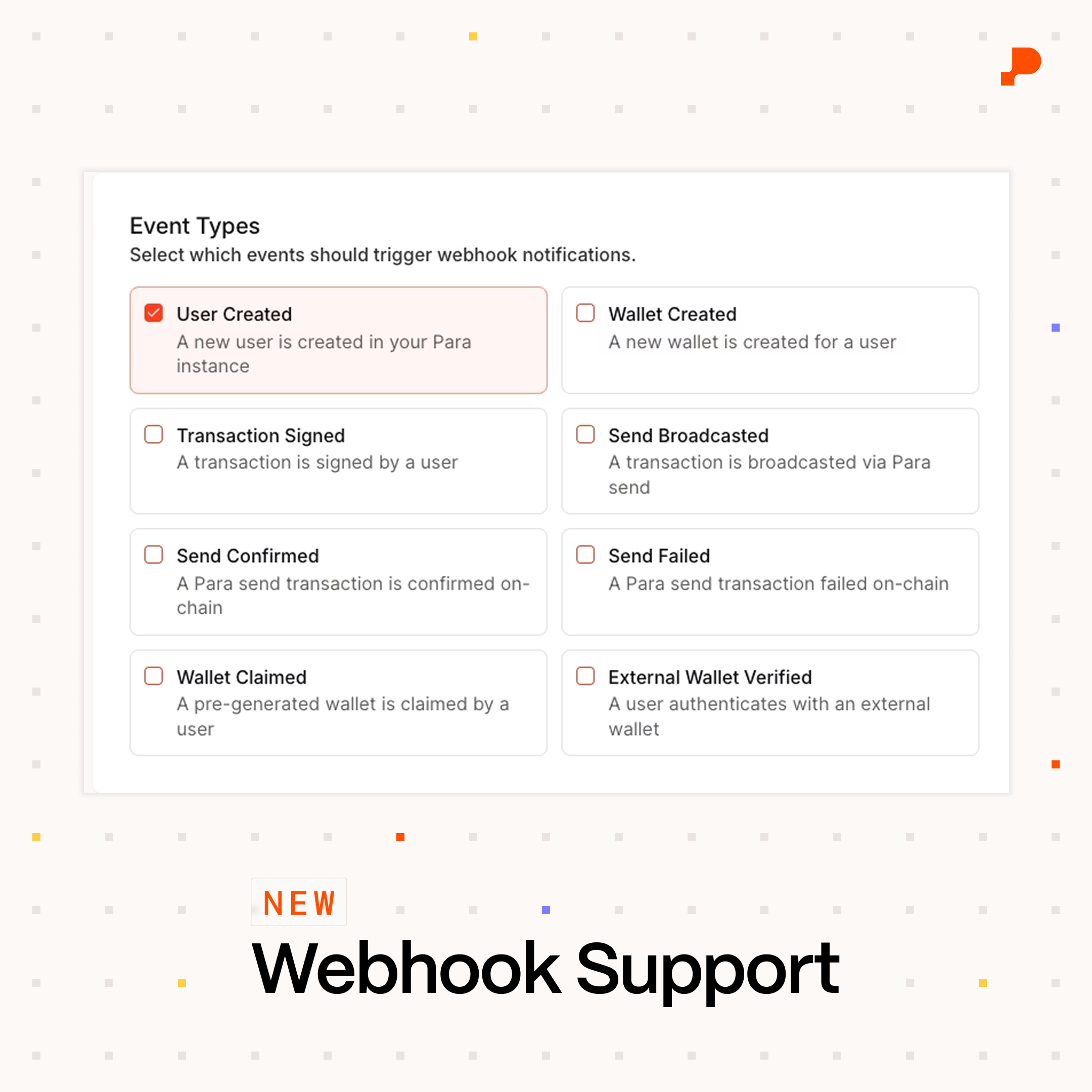
- Select which event types you want to subscribe to
- Save your configuration. Para will generate a signing secret (prefixed with whsec_) that you'll use to verify incoming requests. Copy it somewhere safe; it's only shown once.
Once configured, you can use the Test Webhook button to send a test.ping event and confirm your endpoint is reachable.
Events You Can Subscribe To
Para webhooks cover the key lifecycle events in your integration:
- user.created : A new user registered
- wallet.created : A wallet was created for a user
- wallet.pregen_claimed : A pre-generated wallet was claimed
- user.external_wallet_verified : A user verified an external wallet
- transaction.signed : A transaction was signed
- send.broadcasted : A Para Send transaction was broadcast to the network
- send.confirmed : A Para Send transaction was confirmed on-chain
- send.failed: A Para Send transaction failed
Every event arrives with a standard envelope: a unique event ID, the event type, an ISO 8601 timestamp, and the event-specific data payload.
Verifying Webhook Signatures
Every webhook request Para sends includes three headers: webhook-id, webhook-timestamp, and webhook-signature. You should always verify the signature before trusting a payload.
The verification flow is straightforward: construct a signed message from the timestamp and raw request body, compute an HMAC-SHA256 using your webhook secret, base64-encode the result, and compare it to the value in the webhook-signature header.
Get Started
Webhooks are available now. Head to the Para Developer Portal to configure your endpoint, and check out the Para docs for the full event schema reference and code samples. We're excited to see what you build ✴️